🚀 Trident Volume Profiles Pack for MetaTrader 5 — Installation & Setup 🚀
📥 Download the archive with indicators & updates:
👉 https://www.invest74.ru/files/TVP_pack.zip
🔧 Installing the Indicators:
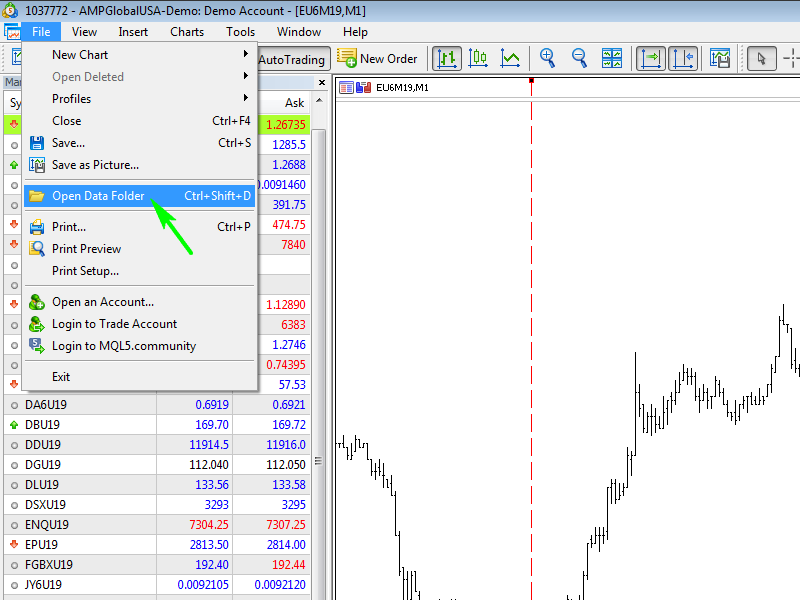
- 📁 In your MT5 terminal, go to “File” → “Open Data Folder”.
- 📂 Copy all folders from the downloaded archive into your
MQL5 folder.
- ♻️ Refresh indicators or restart the terminal.
⚙️ Required Settings:
✅ Allow DLL imports:
Tools → Settings → Experts → Allow DLL imports
✅ Add these URLs to allowed list (Tools → Settings → Experts → Allowed URLs):
🌐 185.189.13.127
🌐 185.252.144.98
🌐 https://api.telegram.org
✅ Enable precise time scale:
Settings → Charts → Precise time scale
—
📊 How to Use:
🔹 For brokers with REAL VOLUMES (AMP, Finam, etc.):
➡️ Use the Templates_footprint indicator (from the tvp folder) to select a template.
🔹 For ALL OTHER brokers & charts (tick volumes):
➡️ Launch the Templates_tick indicator — works universally!
—
⏱️ First Launch Instructions:
- Switch to the timeframe specified first in the template’s name.
- Click on your chosen template 🖱️.
- ⏳ On first launch, transaction data will load — usually takes under 10 seconds (depends on internet speed).
- After a short pause, click the template again → indicators will appear on your chart! ✅
—
💡 Pro Tip:
Bookmark this guide — it’ll save you time during updates or terminal reinstallation!
📈 Happy trading with Trident Volume Profiles! 🐉📊